An AI sales workspace for export companies

Customers write on WhatsApp. AI answers first. You decide what matters.

IceSell is an AI sales workspace for export companies. Its built-in Agent (an AI sales assistant) answers customers, finds out what they need and picks out the serious buyers. Prices, complaints and payment it never decides alone: those go to your team.

  • 16 customer languages
  • The Agent never quotes a price
  • You approve replies, or let it send
  • Works in a phone browser, no app
IceSell conversation page: customer list on the left, the customer's English message with a Chinese translation and the Agent's reply in the middle, the customer's needs summary and to-dos on the right. The screenshot comes from a made-up demo company.

Six things IceSell does for you

The screenshots come from a made-up demo company: every customer, number and name is invented. The interface shown is the Simplified Chinese one.

Answers first

Every customer gets an answer first

The Agent answers common questions on WhatsApp and asks what the customer needs, around the clock.

  • It replies in the language the customer writes in: 16 languages in all.
  • By default its first reply says it is an AI assistant, and if a customer asks whether they are talking to a robot, it always answers honestly.
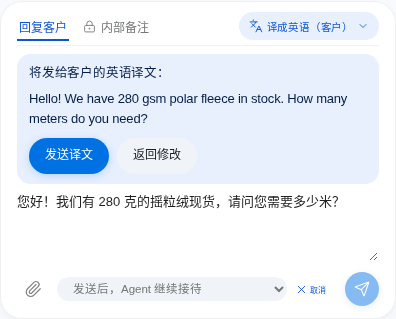
  • Foreign-language messages come with a translation underneath. What you write is shown translated first, so you can check it before it goes out.
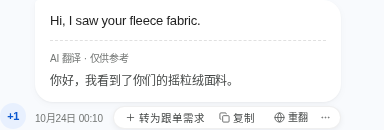
A customer message in English, "Hi, I saw your fleece fabric.", with a Chinese translation underneath labelled as an AI translation, for reference only.
The reply box: after you write in Chinese, you first see the English translation, "Hello! We have 280 gsm polar fleece in stock. How many meters do you need?", and then send it.

Grounded in your material

It answers from what you wrote, and never guesses

Write your FAQ, company profile and product details into the knowledge base, the way you would answer a customer.

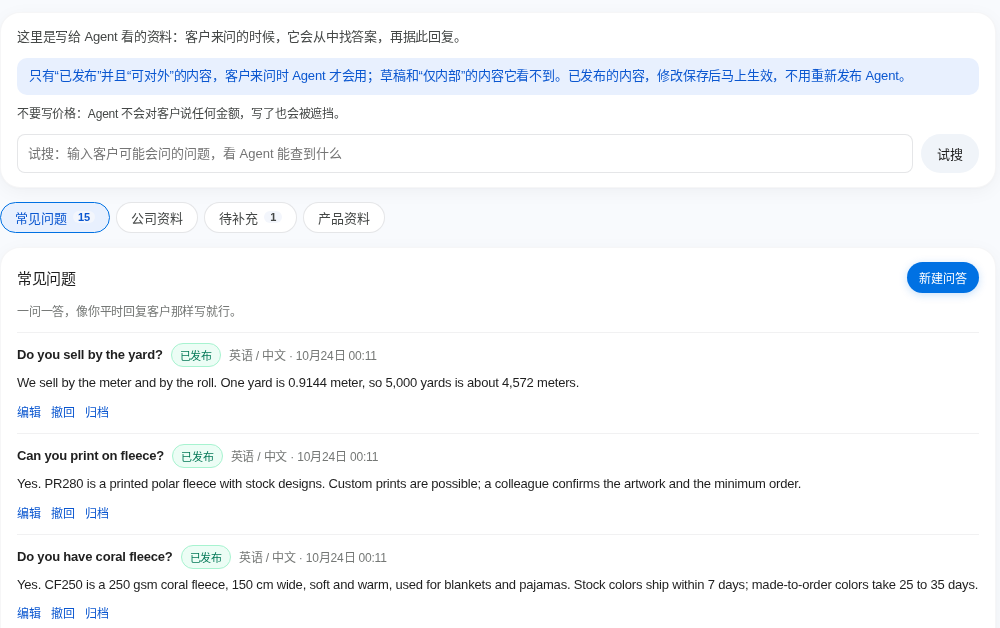
  • It uses only what you have published and marked as customer-facing. Drafts and internal notes stay hidden from it.
  • If the answer is not there, it does not make one up. It tells the customer it will check, and adds the question to a to-add list for you.
  • Changes take effect as soon as you save them.
The knowledge base FAQ page: question-and-answer pairs, each marked as published. A note at the top says the Agent only uses content that is published and customer-facing.

Real buyers

It picks out the customers who really want to buy

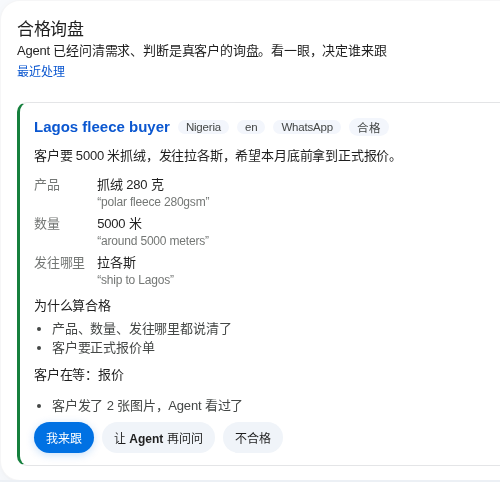
The Agent finds out the product, the quantity and where it is going. Only when a customer has made what looks like a real purchase request does a qualified-inquiry card appear on your workbench. The rest do not disturb you.

  • Each card shows the customer's own words, why it counts as qualified and what the customer is waiting for.
  • Take it yourself, ask the Agent to ask one more thing, or mark it not qualified.
  • You decide which details a customer must give before it counts.
A qualified-inquiry card on the workbench: a customer from Nigeria wants 5,000 meters of fleece shipped to Lagos. The product, quantity and destination each show the customer's own words, and three buttons at the bottom let you take it, ask the Agent to ask more, or mark it not qualified.

People decide

Prices, samples, complaints, payment: they come to you

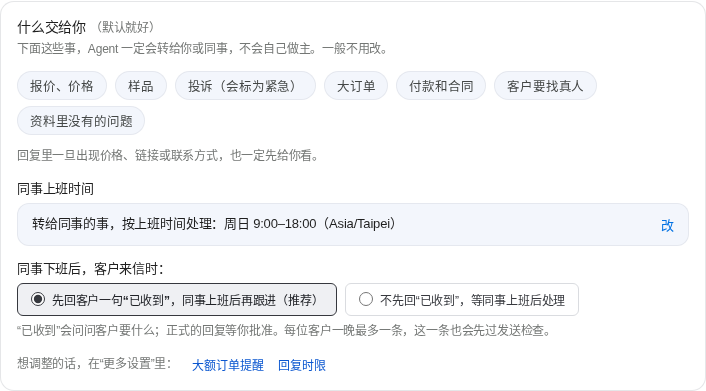
When a customer asks for a price, wants samples, complains, talks about payment or a contract, asks for a person, or asks something your material does not cover, the Agent always passes it to you or a colleague.

  • It never states an amount. Prices, discounts and payment terms go out only as a quotation from your team.
  • If a reply contains a price, a link or contact details, it waits for your approval first.
  • When a customer asks not to be contacted, it stops replying and stops following up. If it is not sure, you decide.
The Agent page, "what goes to you": price and quotation, samples, complaints, large orders, payment and contracts, a customer asking for a person, and questions your material does not cover.

Your call

Nothing goes out without your approval, unless you say so

Replies the Agent writes can wait in a pending-messages list. Read one, approve it, change a few words, or reject it.

  • We suggest starting with every reply approved by you, and switching to automatic sending once you trust it.
  • Before a reply goes out automatically, a second AI reads it again and holds back anything it is unsure about.
  • You can approve from your phone's browser too.
A pending-messages card: the Agent's English reply with its Chinese meaning, and three buttons below: approve and send, edit, reject.

One record per customer

Customers, quotes, samples and orders in one place

When a customer writes for the first time, IceSell creates the record for you. No typing it in.

  • The record shows the country, the language and the customer's local time (working hours, or the middle of the night, so you know before you call), plus a short summary of the conversation.
  • A customer can have several deals at once. Quotes, samples, contracts and orders hang under each deal, so they do not get mixed up.
  • A submitted quotation must be approved by another colleague with approval rights before it goes to the customer.
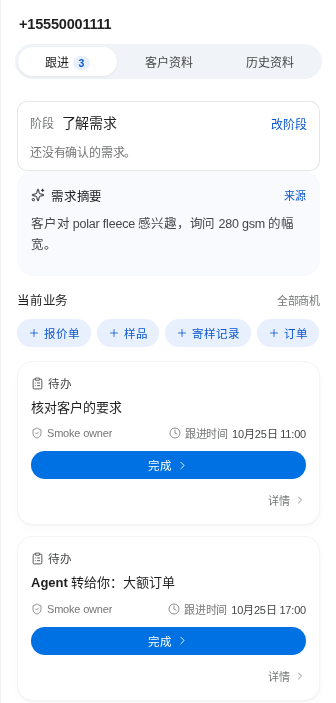
The customer panel next to a conversation: the customer's stage, a summary of what they need, buttons to start a quotation, sample, shipment record or order, and this customer's to-dos.

How to start

Three steps. No coding.

  1. Get your workspace

    We open a workspace of your own at companyname.icesell.app, or you install it on your own server. You open the address and set your own password. You are the Owner.

  2. Tell it about your company

    Connect your company's own AI account (a one-time step) and link your company's WhatsApp number by scanning a code with your phone. Write your company profile and FAQ and publish your products, or paste a short introduction and let AI fill in the Agent's name, introduction and tone. A getting-started checklist on the workbench walks you through it.

  3. Rehearse first, then let customers in

    Play the customer and chat with the Agent: see how it answers and what it passes to you. Rehearsal replies are never sent to anyone. When you are happy, let real customers in. The Owner decides when messages really go out, by switching on live sending.

Where your data lives, and who can see it

IceSell can be used in two ways. Either way, every company gets its own workspace and its own database, never shared with another company.

We host it

We host it for you

Every company gets a separate workspace at companyname.icesell.app, with its own program, its own database and its own backups. We look after running, backing up and upgrading the server. You just use it.

Your own server

Install it on your own server

We give you an installation package. Your IT team installs it on one Linux server with a single command (Docker is required), and the data stays on your own machine. A good fit for companies with rules about where data may be kept.

How the data is looked after

  • Permissions per person Everyone has their own account. What they can see and do depends on their role and permissions. Colleagues without permission cannot see a customer's phone number or amounts.
  • The Agent has limits too The Agent cannot see prices, costs, quotations, contracts or supplier details.
  • Keys are stored encrypted The key to your company's AI account is stored encrypted on the server, and only its last four characters are shown on screen.
  • Daily backups Backups run automatically every day. They can be encrypted and copied to somewhere outside the server, and a restore drill runs automatically every month to confirm that a backup really restores.
  • Upgrades can be undone A backup is made before every upgrade. If the new version fails, the system goes back to the old one by itself.
  • Who did what Who did which important action, and when, can be looked up in the activity log.
Good to know When the Agent answers a customer, the conversation is sent to the AI provider you chose, through your company's own AI account.

FAQ

How is IceSell different from an ordinary chatbot?

An ordinary chatbot only replies. IceSell is a complete sales workspace: customer records, conversations, quotations, samples, contracts and orders are all in it, and the Agent is just the part that receives customers. It does only what it can do: answer from your material and find out what the customer needs. Quotes, complaints and payment go to your team.

Will the Agent quote prices by itself?

No. The Agent never states an amount to a customer. When someone asks for a price, it first finds out the product, quantity and destination, then passes the enquiry to a colleague. Prices, discounts and payment terms go out only as a quotation from your team, and a quotation must be approved by another colleague who has approval rights.

Do customers know they are talking to an AI?

Yes. By default the Agent's first reply says it is an AI assistant, and if a customer asks whether it is a robot, it always answers honestly. That part cannot be switched off.

How does the WhatsApp connection work? Is it official?

No, it is not an official integration. IceSell is an independent product and is not affiliated with WhatsApp or Meta.

Today you connect your company's number by scanning a QR code with the phone, through WhatsApp's linked-devices feature. It takes a few minutes. That is WhatsApp's unofficial route, and a number that sends a lot of automatic messages can be restricted or even banned. So IceSell slows its sending down, limits how many messages the Agent starts on its own each day, and pauses automatic sending and alerts you if sending keeps failing. If the number matters a lot to you, let the Agent's replies wait for your approval.

WhatsApp also has an official business connection, the WhatsApp Business Platform. It needs a verified Meta business account, usually needs technical help to set up, and is steadier. IceSell includes that connection, which needs its own setup, so please talk to us first.

Do we need our own AI account? How is the AI paid for?

Yes. The Agent uses an AI service to understand customers and write replies, and translation uses it too. You connect your company's own AI account in IceSell: OpenAI, Claude (Anthropic) or Gemini (Google), or other services such as DeepSeek, Qwen (Tongyi Qianwen) or Ollama. The AI provider bills you by use. You can also set a usage limit for the whole company: when it is reached, the Agent stops by itself and new customer messages go to your team.

What does it cost?

The price depends on how your company uses IceSell. Contact us and we will work it out together.

Does it work on a phone? Do we need an app?

No app is needed. IceSell is a web page: open the same address in your phone's browser and sign in with the same account. You can approve replies, read conversations and take over a chat. Pages with many settings, such as the Agent page, also work on a phone, but we suggest doing those on a computer.

Which channels does it work with besides WhatsApp?

Today the only customer channel is WhatsApp. Email and other channels are not connected yet.

Which languages does the interface use?

The interface comes in Simplified Chinese, Traditional Chinese and English, and you can switch at any time. This only changes the interface text, not the language your customers write in. The user guide is currently available in Chinese only.

Can our developers connect their own tools?

Yes. IceSell has an open API and an MCP connection, so AI assistants such as Claude Code or Codex can be connected. Each permission is limited to what the person granting it can do and can be revoked at any time. Anything that sends a message or changes records has to be confirmed by that person on the web page. It is usually set up by whoever installs the system.

Leave your details and we'll come to you

Tell us what you sell, which countries you sell to and how you handle customers today. We will get in touch, tell you whether IceSell fits, and work out together how to start.

Rather not fill in a form? Email us directly: sales@icesell.app

Leave at least one: WhatsApp, email or phone

We only use this to get back to you.